🚀 Outsmarting GitHub Actions: A Cost-Effective Approval Workflow Without Breaking the Bank
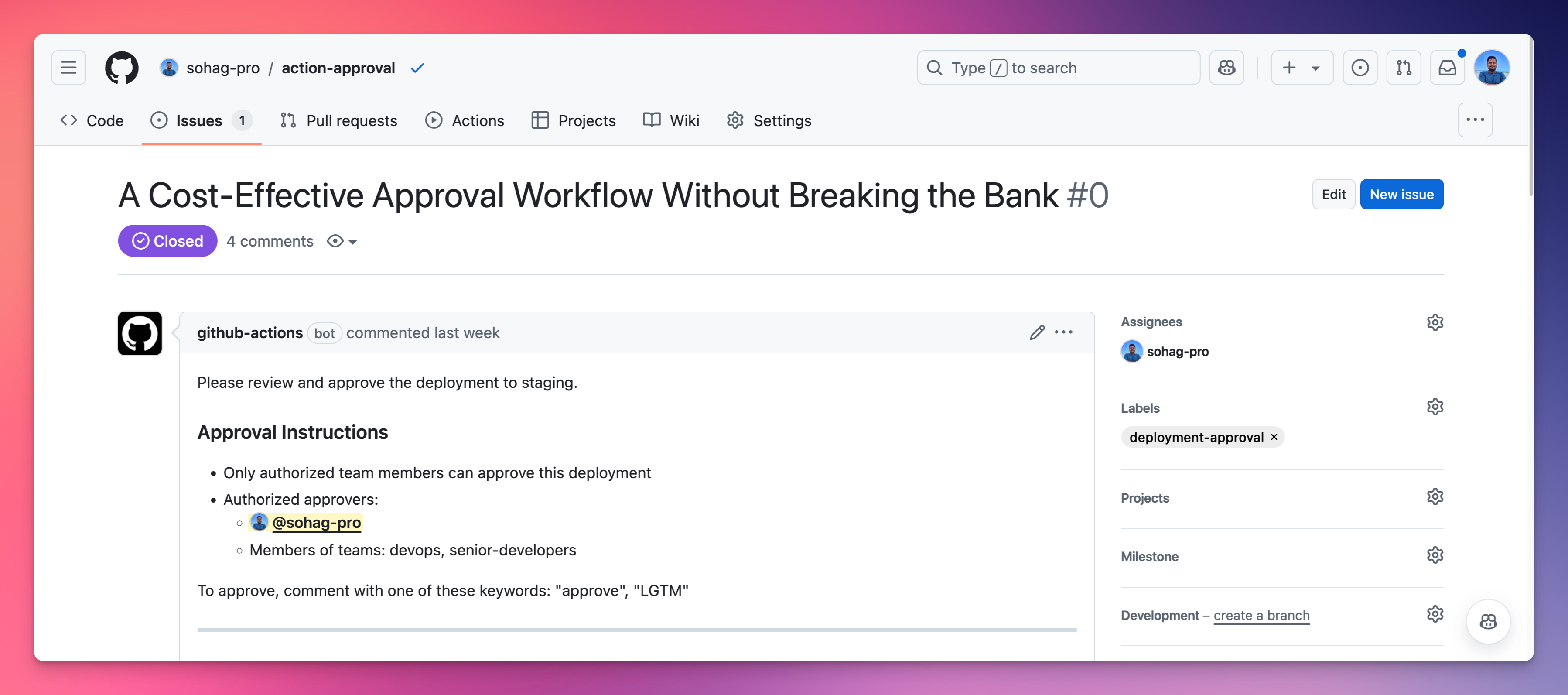
A Cost-Effective Approval Workflow Without Breaking the Bank
In the world of continuous deployment, every second (and every penny) counts. Today, I'm going to show you a clever GitHub Actions hack that can save your team time and money while maintaining rock-solid deployment controls.
The Problem with Traditional Approval Workflows
Manual workflow approvals in GitHub Actions are great in theory, but they come with a hidden cost. While the workflow waits for human approval, you're burning through your Actions minutes - essentially paying for waiting time. Not very efficient, right?
Introducing the Issue-Based Approval System
What if we could create an approval workflow that:
Costs nothing while waiting
Provides clear tracking
Offers granular access control
Works seamlessly with your existing GitHub workflow
Let me introduce you to our ingenious solution: an Issue-Based Deployment Approval System.
✨ How It Works: The Science Behind the Magic
Workflow Trigger
When code is pushed to the
devbranch or a pull request is mergedAn automatically created GitHub issue prompts for deployment approval
Approval Mechanism
Only specific team members or team roles can approve
Approval is as simple as commenting "approve" or "LGTM" on the issue
Built-in security checks verify the approver's identity
Deployment
Once approved, the deployment runs immediately
The approval issue is automatically closed
A comment tracks who approved and what was deployed
A real world example
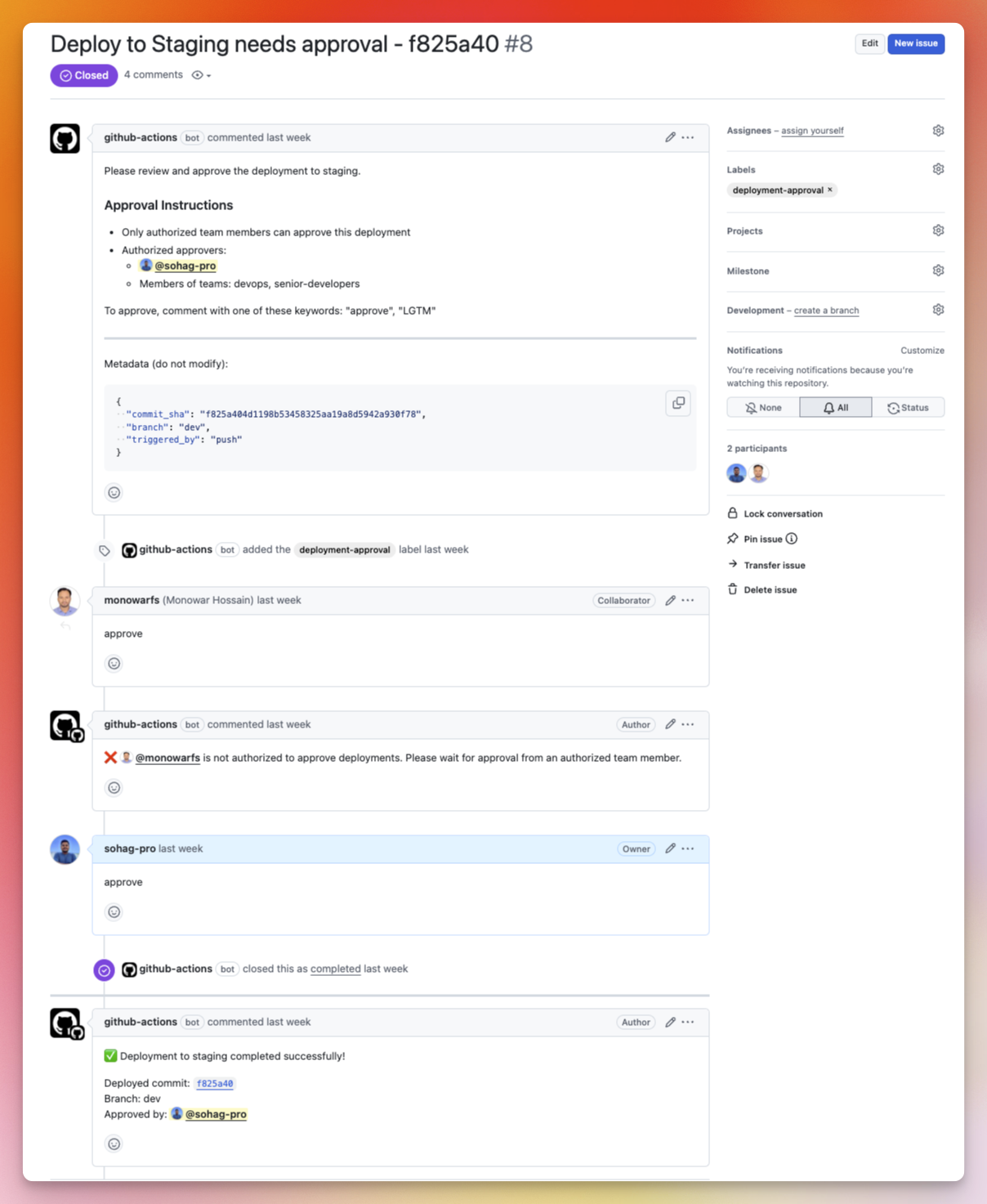
Wanna see if it’s true, check it here: https://github.com/sohag-pro/action-approval/issues/8
Action Implemented Repo: https://github.com/sohag-pro/action-approval
Please give a ⭐ if you find it helpful.
I'll share the two key workflow files that make this magic happen:
1. Issue Creation Workflow
.github/workflows/create-approval-issue.yml file
name: Create Approval Issue

on:
  push:
    branches:
      - dev
  pull_request:
    types: [closed]
    branches:
      - dev
permissions:
  issues: write
  contents: read

jobs:
  create-approval-issue:
    runs-on: ubuntu-latest
    if: github.event.pull_request.merged == true || github.event_name == 'push'
    steps:
      - name: Create Approval Issue
        uses: actions/github-script@v7
        with:
          script: |
            let commitSha = '';
            if (context.eventName === 'pull_request') {
              commitSha = context.payload.pull_request.merge_commit_sha;
            } else {
              commitSha = context.sha;
            }

            const shortSha = commitSha.substring(0, 7);

            const issueBody = `
            Please review and approve the deployment to staging.

            ### Approval Instructions
            - Only authorized team members can approve this deployment
            - Authorized approvers:
              - @sohag-pro
              - Members of teams: devops, senior-developers

            To approve, comment with one of these keywords: "approve", "LGTM"

            ---
            Metadata (do not modify):
            \`\`\`json
            {
              "commit_sha": "${commitSha}",
              "branch": "dev",
              "triggered_by": "${context.eventName}"
            }
            \`\`\`
            `;

            const issue = await github.rest.issues.create({
              owner: context.repo.owner,
              repo: context.repo.repo,
              title: `Deploy to Staging needs approval - ${shortSha}`,
              body: issueBody,
              labels: ['deployment-approval']
            });
            console.log(`Created issue #${issue.data.number}`);
🚀 Create Issue Workflow Explanation
Trigger:
push: When a new commit is pushed to thedevbranch.pull_request: When a pull request targeting thedevbranch is merged.
Permissions:
issues: write: To create an issue.contents: read: To read repository information.
Job: create-approval-issue
- Runs-on:
ubuntu-latest.
Condition:
The job runs if:
A pull request was merged (
github.event.pull_request.merged == true).Or the event is a
push.
Steps:
Create Approval Issue:
Uses the
actions/github-scriptaction.Extracts the commit SHA:
If the trigger is
pull_request, it uses themerge_commit_shaof the pull request.Otherwise, it uses the SHA of the latest pushed commit (
context.sha).
Creates a short SHA (first 7 characters) for readability.
Constructs an issue body that includes:
Instructions for the approval process.
Metadata (commit SHA, branch, trigger source) in JSON format.
Creates a new issue with:
Title:
Deploy to Staging needs approval - <short SHA>.Body: Approval instructions and metadata.
Label:
deployment-approval.
Purpose:
This workflow automates the creation of a tracking issue for deployment approval:
Ensures all deployments to staging are documented and require explicit approval.
Simplifies the process for authorized users to approve a deployment by commenting on the issue.
Key Highlights:
Uses metadata for traceability (e.g., commit SHA, branch, and event source).
Directly ties deployments to commits or merge events for better tracking.
Encourages controlled deployments via a formal approval workflow.
2. Deployment Approval Workflow
.github/workflows/deploy-staging.yml
name: Deploy to Staging

on:
  issue_comment:
    types: [created]
    if: |
      contains(github.event.issue.title, 'Deploy to Staging needs approval')

permissions:
  issues: write
  contents: read
  pull-requests: read

jobs:
  process-approval:
    runs-on: ubuntu-latest

    if: |
      contains(github.event.issue.title, 'Deploy to Staging needs approval') &&
      (contains(github.event.comment.body, 'approve') || contains(github.event.comment.body, 'LGTM'))
    steps:
      - name: Check Approver
        id: check-approver
        uses: actions/github-script@v7
        with:
          script: |
            // Define allowed approvers
            const ALLOWED_APPROVERS = [
              'sohag-pro',
              'tech-lead',
              'devops-engineer'
            ];

            // Define allowed teams (team slugs)
            const ALLOWED_TEAMS = [
              'devops',
              'senior-developers'
            ];

            const commenter = context.payload.comment.user.login;
            console.log(`Comment by: ${commenter}`);

            // First check if user is directly in allowed list
            if (ALLOWED_APPROVERS.includes(commenter)) {
              console.log('Approver is in allowed users list');
              core.setOutput('status', 'authorized');
              return;
            }

            // Check if user is member of allowed teams
            let isTeamMember = false;
            for (const team of ALLOWED_TEAMS) {
              try {
                const { data: isMember } = await github.rest.teams.getMembershipForUserInOrg({
                  org: context.repo.owner,
                  team_slug: team,
                  username: commenter
                });

                if (isMember.state === 'active') {
                  console.log(`Approver is member of team: ${team}`);
                  isTeamMember = true;
                  break;
                }
              } catch (error) {
                console.log(`Error checking membership in team ${team}:`, error.message);
                continue;
              }
            }

            if (isTeamMember) {
              core.setOutput('status', 'authorized');
            } else {
              console.log('User not authorized to approve deployments');
              core.setOutput('status', 'unauthorized');
            }

      - name: Handle Unauthorized User
        if: steps.check-approver.outputs.status == 'unauthorized'
        uses: actions/github-script@v7
        with:
          script: |
            const approver = context.payload.comment.user.login;
            await github.rest.issues.createComment({
              owner: context.repo.owner,
              repo: context.repo.repo,
              issue_number: context.payload.issue.number,
              body: `❌ @${approver} is not authorized to approve deployments. Please wait for approval from an authorized team member.`
            });
            core.setFailed('Approval must come from an authorized user or team member');

      - name: Extract commit SHA
        id: extract-sha
        if: steps.check-approver.outputs.status == 'authorized'
        uses: actions/github-script@v7
        with:
          script: |
            const issueBody = context.payload.issue.body;
            const match = issueBody.match(/"commit_sha":\s*"([a-f0-9]+)"/);
            if (!match) {
              core.setFailed('Could not find commit SHA in issue body');
              return;
            }
            const commitSha = match[1];
            core.setOutput('commit_sha', commitSha);
            console.log(`Extracted commit SHA: ${commitSha}`);

      - uses: actions/checkout@v2
        if: steps.check-approver.outputs.status == 'authorized'
        with:
          ref: ${{ steps.extract-sha.outputs.commit_sha }}

      - name: Verify correct commit
        if: steps.check-approver.outputs.status == 'authorized'
        run: |
          current_sha=$(git rev-parse HEAD)
          expected_sha=${{ steps.extract-sha.outputs.commit_sha }}
          if [ "$current_sha" != "$expected_sha" ]; then
            echo "Error: Checked out SHA ($current_sha) does not match expected SHA ($expected_sha)"
            exit 1
          fi
          echo "Verified correct commit SHA: $current_sha"

      - name: Deploy to Staging
        if: steps.check-approver.outputs.status == 'authorized'
        run: |
          echo "Deploying commit ${{ steps.extract-sha.outputs.commit_sha }} to staging..."
          # Add your deployment commands here

      - name: Close Approval Issue
        if: steps.check-approver.outputs.status == 'authorized'
        uses: actions/github-script@v7
        with:
          script: |
            const issue_number = context.payload.issue.number;
            const deployedSha = '${{ steps.extract-sha.outputs.commit_sha }}';
            const approver = context.payload.comment.user.login;

            // Close the issue
            await github.rest.issues.update({
              owner: context.repo.owner,
              repo: context.repo.repo,
              issue_number: issue_number,
              state: 'closed'
            });

            // Add completion comment
            await github.rest.issues.createComment({
              owner: context.repo.owner,
              repo: context.repo.repo,
              issue_number: issue_number,
              body: `✅ Deployment to staging completed successfully!\n\nDeployed commit: ${deployedSha}\nBranch: dev\nApproved by: @${approver}`
            });
This GitHub Actions workflow automates the deployment of a commit to a staging environment based on approval comments in a GitHub issue. Here's a breakdown of its components:
🤖 Deploy workflow explanation
Trigger:
Event:
issue_commentis created.Condition: The issue title must contain the phrase
"Deploy to Staging needs approval". The action runs only if this condition is met.
Permissions:
The workflow uses:
issues: write(to interact with issues and comments),contents: read(to fetch repository data),pull-requests: read.
Jobs:
1. process-approval:
Runs-on:
ubuntu-latest.Condition: The issue must meet the following:
Title contains
"Deploy to Staging needs approval".The comment body includes the keywords
approveorLGTM.
Steps:
Check Approver:
Uses the
actions/github-scriptaction.Checks if the commenter:
Is in the list of allowed users (
sohag-pro,tech-lead,devops-engineer), orBelongs to one of the allowed teams (
devops,senior-developers).
If authorized:
- Sets the status to
authorized.
- Sets the status to
If unauthorized:
- Adds a comment rejecting the user's approval and fails the job.
Handle Unauthorized User:
- Posts a rejection comment if the user isn't authorized.
Extract Commit SHA:
Extracts the
commit_shafrom the issue body using regex.Fails if no valid SHA is found.
Checkout the Repository:
- Checks out the repository using the extracted
commit_sha.
- Checks out the repository using the extracted
Verify Correct Commit:
- Ensures the checked-out commit matches the extracted SHA.
Deploy to Staging:
- Executes deployment commands for the staging environment (placeholder for real deployment logic).
Close Approval Issue:
Closes the issue and adds a success comment with details:
Deployed commit SHA,
Branch name,
Approver's GitHub handle.
Purpose:
Ensures controlled deployment to staging by verifying the approver's identity and explicitly approving the commit.
Tracks the deployment process through issue comments and statuses.
Key Highlights:
Implements a strict approval mechanism.
Utilizes team-based and individual-based authorization.
Automatically documents deployment activities in the related issue.
💡 Key Benefits
Cost-Effective: Only pay for actual deployment time
Secure: Strict access controls
Transparent: Clear audit trail of who approved what
Flexible: Easy to customize for your team's needs
Real-World Implementation Tips
Customize the
ALLOWED_APPROVERSandALLOWED_TEAMSAdd more detailed logging for compliance
Consider adding more approval keywords
Implement additional security checks as needed
Conclusion
This workflow demonstrates how a little creativity can solve real DevOps challenges. By thinking outside the traditional CI/CD box, we've created a solution that's not just clever, but genuinely useful.
Ready to Level Up Your Deployment Game? 🚀
Fork the workflows, adapt them to your needs, and watch your deployment process transform!
Would you like me to refine any part of the blog post or add more technical details?
About the author
WhoAmI => notes.sohag.pro/author
Comments
Join the discussionNo comments yet. Be the first to comment.