Deleting One Server Fixed Twenty Audit Findings
Our static documentation site ran on an EC2 box behind nginx, with SSH open to the internet. A quarterly PCI scan returned twenty-plus findings on that one host. Here is how we migrated it to S3 and CloudFront and dropped the finding count to zero, including the parts the AWS docs skip over.
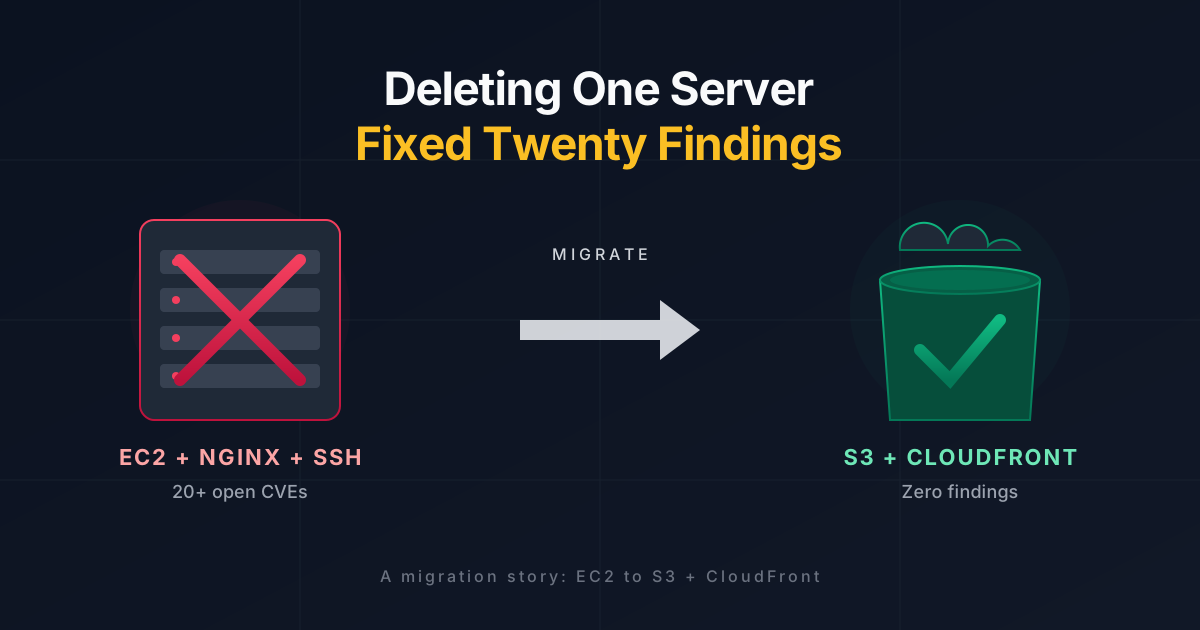
The quarterly PCI scan came back with a familiar pattern. Three of our six in-scope hosts passed. Of the three that failed, one was responsible for most of the noise: a static developer documentation site running on a single EC2 instance behind nginx, with SSH listening on port 22 to the whole internet. The scanner flagged twenty-plus CVEs across nginx and OpenSSH on that one host, and most of them traced back to the fact that we had never built a reliable patching workflow for it.
The host did not run application code. It served a Vite + React single-page app built in CI and shipped to a directory under /var/www/ by rsync over SSH. Everything about the architecture made it look like a static site except where it mattered: it was still an operating system we owned.
Patching was an option. We looked at it first, and the plan was straightforward: upgrade packages, rewrite the sshd config, lock port 22 at the Security Group to a bastion CIDR. That path works, but it leaves us owning the same problem next quarter. The alternative was to delete the server. If the artefact is 30 MB of HTML, JS, and MP4, S3 and CloudFront serve it directly and there is no nginx version to track.
We went with the deletion.
What we were migrating to
The target architecture has three AWS pieces:
A private S3 bucket that holds the built site. No public ACL, no website hosting mode, no public access at all.
A CloudFront distribution in front of it, with an Origin Access Control (OAC) that signs requests to S3 as itself.
An ACM certificate for the custom domain, issued in
us-east-1because that is the only region CloudFront reads from.
Nothing else. No Lambda@Edge, no API Gateway, no WAF rules (yet). The only ingress is CloudFront, and CloudFront is the only principal with read access to the bucket.
The thing that is worth getting right the first time is the response headers. CloudFront ships a Response Headers Policy construct, which lets you set CSP, HSTS, Permissions-Policy, X-Content-Type-Options, Referrer-Policy, and a few others at the edge. If you set them there instead of in the HTML, you do not have to rebuild the site to change them, and they apply to every object the distribution serves, including 404s.
The migration, step by step
I will walk through this in the order we did it. The commands use environment variables so you can read them without me censoring IDs.
1. Build the bundle
Vite's production build is deterministic. Hashed assets go in dist/assets/, everything else sits at the top level.
npm ci
npm run build
du -sh dist/
# A few hundred MB in our case because the embedded walkthrough videos
# dominate; your bundle will almost certainly be smaller.
2. Create the bucket, locked down
BUCKET=my-docs-prod
REGION=<your-region>

aws s3api create-bucket --bucket "$BUCKET" --region "$REGION" \
  --create-bucket-configuration LocationConstraint="$REGION"

aws s3api put-bucket-ownership-controls --bucket "$BUCKET" \
  --ownership-controls Rules='[{ObjectOwnership=BucketOwnerEnforced}]'

aws s3api put-public-access-block --bucket "$BUCKET" \
  --public-access-block-configuration \
    BlockPublicAcls=true,IgnorePublicAcls=true,\
BlockPublicPolicy=true,RestrictPublicBuckets=true

aws s3api put-bucket-versioning --bucket "$BUCKET" \
  --versioning-configuration Status=Enabled

aws s3api put-bucket-encryption --bucket "$BUCKET" \
  --server-side-encryption-configuration '{
    "Rules":[{"ApplyServerSideEncryptionByDefault":{"SSEAlgorithm":"AES256"}}]
  }'
The bucket exists, nobody can read from it, and object versioning gives you a free undo if a deploy ever ships a broken file.
3. Upload in three passes
The single aws s3 sync command cannot do what we need, because different categories of files want different Cache-Control headers. If you give the hashed assets a short cache and the index.html a long one, every deploy sends users to a stale shell that references assets that no longer exist. The order below is the one that works:
# 1. Hashed /assets/* get a year, marked immutable
aws s3 sync dist/ "s3://$BUCKET/" --delete \
  --exclude "*" --include "assets/*" \
  --cache-control "public, max-age=31536000, immutable"

# 2. Media files get 30 days
aws s3 sync dist/ "s3://$BUCKET/" \
  --exclude "*" \
  --include "*.png" --include "*.jpg" --include "*.jpeg" \
  --include "*.svg" --include "*.webp" --include "*.gif" --include "*.ico" \
  --include "*.mp4" --include "*.webm" --include "*.mov" \
  --cache-control "public, max-age=2592000"

# 3. Everything else, including index.html, revalidates every time
aws s3 sync dist/ "s3://$BUCKET/" \
  --exclude "assets/*" \
  --exclude "*.png" --exclude "*.jpg" --exclude "*.jpeg" \
  --exclude "*.svg" --exclude "*.webp" --exclude "*.gif" --exclude "*.ico" \
  --exclude "*.mp4" --exclude "*.webm" --exclude "*.mov" \
  --cache-control "no-cache, must-revalidate"
s3 sync infers Content-Type from the extension, so .mp4 serves as video/mp4 and .svg as image/svg+xml. You almost never need to override it.
4. Request the ACM certificate (in us-east-1)
aws acm request-certificate --region us-east-1 \
  --domain-name docs.example.com \
  --validation-method DNS \
  --key-algorithm RSA_2048
Take the DNS validation CNAME from describe-certificate, put it in Route 53, and wait. For a hosted zone in the same account this is one change-resource-record-sets call. Validation usually completes inside five minutes.
5. OAC, bucket policy, and distribution
The Origin Access Control is a one-line resource. The bucket policy that lets CloudFront read from the bucket is six lines. The distribution itself is where the configuration earns its keep.
Two parts of the distribution config are worth calling out:
SPA fallback. The site uses client-side routing, so /guides/some-route has to resolve to /index.html. CloudFront's CustomErrorResponses block handles that: tell it to turn 403 and 404 from S3 into 200 responses that serve /index.html. S3 returns 403 for keys that don't exist when the caller lacks s3:ListBucket, which is the correct permission for a locked-down origin. If you grant ListBucket just to turn those 403s into 404s, you are weakening the policy for cosmetic reasons.
"CustomErrorResponses": {
  "Quantity": 2,
  "Items": [
    {"ErrorCode": 403, "ResponsePagePath": "/index.html", "ResponseCode": "200", "ErrorCachingMinTTL": 10},
    {"ErrorCode": 404, "ResponsePagePath": "/index.html", "ResponseCode": "200", "ErrorCachingMinTTL": 10}
  ]
}
Minimum TLS and viewer protocol. Set MinimumProtocolVersion to TLSv1.2_2021 and ViewerProtocolPolicy to redirect-to-https. The scanner we failed earlier would have flagged anything older.
6. Response headers policy
The policy that applies CSP, HSTS, and the rest sits next to the distribution and is referenced from the default cache behaviour. The CSP we started with:
default-src 'self';
script-src 'self';
style-src 'self' 'unsafe-inline' https://fonts.googleapis.com;
img-src 'self' data: https:;
media-src 'self';
connect-src 'self';
font-src 'self' data: https://fonts.gstatic.com;
object-src 'none';
base-uri 'self';
frame-ancestors 'self';
form-action 'self';
upgrade-insecure-requests
I started without Google Fonts in the policy and discovered the hard way that the CSS in the Vite build references fonts.googleapis.com and the resulting stylesheet pulls fonts.gstatic.com. The console shows a style-src violation on first load. Fixing it is a one-call update to the Response Headers Policy, with no redeploy of the site.
7. DNS cutover
The ALIAS record points at the CloudFront distribution's domain, with the hard-coded CloudFront hosted zone ID Z2FDTNDATAQYW2. That ID is the same in every AWS region. Add both A and AAAA so IPv6 clients get served from CloudFront too.
Before you flip DNS, run smoke tests against the *.cloudfront.net domain and confirm:
/returns 200 and the right HTML.A nonexistent SPA route returns 200 with the index HTML (the fallback is working).
/assets/<a-hashed-file>hascache-control: public, max-age=31536000, immutable./index.htmlhascache-control: no-cache, must-revalidate.The response headers include CSP, HSTS, X-Content-Type-Options, and Permissions-Policy.
Fix anything you find there, not later.
CI/CD with GitHub Actions and OIDC
The old pipeline embedded an SSH key as a repository secret and ran rsync into the EC2 instance. The new one assumes an IAM role via GitHub's OIDC provider, with no long-lived AWS credentials stored anywhere.
The trust policy allows the role to be assumed only by the specific repository and branch:
{
  "Effect": "Allow",
  "Principal": { "Federated": "arn:aws:iam::ACCOUNT:oidc-provider/token.actions.githubusercontent.com" },
  "Action": "sts:AssumeRoleWithWebIdentity",
  "Condition": {
    "StringEquals": { "token.actions.githubusercontent.com:aud": "sts.amazonaws.com" },
    "StringLike":   { "token.actions.githubusercontent.com:sub": "repo:ORG/REPO:ref:refs/heads/main" }
  }
}
One trap worth flagging: if your workflow uses an environment: block, GitHub changes the sub claim from ref:refs/heads/main to environment:<env-name>. The role trust policy has to match whichever form you ship. We lost twenty minutes on that during the cutover and only noticed when the first assume-role call returned "Not authorized to perform sts:AssumeRoleWithWebIdentity" with no further detail. The fix is to include both patterns in the trust policy, or to drop the environment block if you are not using the feature yet.
The workflow itself is the three-pass sync plus a CloudFront invalidation targeted at HTML entry points only (hashed assets never need invalidation):
- uses: aws-actions/configure-aws-credentials@v4
  with:
    role-to-assume: ${{ secrets.AWS_DEPLOY_ROLE_ARN }}
    aws-region: <your-region>

# ... three s3 sync steps ...

- run: |
    INV_ID=$(aws cloudfront create-invalidation \
      --distribution-id "${{ secrets.CLOUDFRONT_DISTRIBUTION_ID }}" \
      --paths "/" "/index.html" "/404.html" \
      --query 'Invalidation.Id' --output text)
    aws cloudfront wait invalidation-completed \
      --distribution-id "${{ secrets.CLOUDFRONT_DISTRIBUTION_ID }}" \
      --id "$INV_ID"
A full deploy takes about ninety seconds end to end, most of which is CloudFront waiting for the invalidation to propagate.
Decommissioning the old host
Give the new setup forty-eight hours in production before touching the EC2 instance. During that window we snapshotted every attached EBS volume with a ninety-day retention tag, then revoked the Security Group's public ingress and watched for an hour. Nothing broke. The instance stopped cleanly, and after a week of stable CloudFront traffic the plan was to terminate.
The order matters. Snapshot first, revoke second, stop third, terminate last, and release the Elastic IP only after you have confirmed nothing in Route 53 still points at the public IP. Rollback at every step is a single aws CLI call back to a saved state.
What the next scan returned
The TLS probes we ran against the new domain after cutover show no Server: banner, no port 22 (CloudFront does not expose SSH), HSTS present with a one-year max-age, and TLS 1.0 and 1.1 refused. The twenty-plus CVEs that were tied to the EC2 host's nginx and OpenSSH versions became irrelevant the moment the host stopped serving traffic. The CSP, HSTS, Permissions-Policy, X-Content-Type-Options, and Referrer-Policy headers that the audit expected on the application layer are now set at the edge, consistent across every response the distribution returns.
The bill difference is a rounding error. CloudFront's permanent free tier covers 1 TB of monthly transfer and 10 million HTTPS requests. For a developer documentation portal, you will not come close. Our worst-case projection, including room for traffic growth, was under three dollars a month, and the first real month came in at zero.
Things to copy, things to skip
Copy the three-pass sync pattern. Fighting with Cache-Control after the fact is far worse than getting it right at upload.
Copy the OIDC-based deploy. Long-lived access keys as GitHub secrets are a liability you do not need. The one-time setup is less work than rotating keys when someone leaves.
Copy the Response Headers Policy approach for CSP and HSTS. Putting them in the HTML means every change requires a deploy and risks a stale cached header on a long-TTL asset.
Skip Lambda@Edge for anything a Response Headers Policy or CloudFront Function can do. Lambda@Edge has its own patch cadence, which is the problem we were trying to delete in the first place.
Skip the temptation to turn the bucket itself into a website origin. The static website endpoint supports public ACLs, HTTP-only, and no OAC. If you are migrating for compliance reasons, you want the opposite of all three.
Skip the environment block in the GitHub Actions workflow unless you have a specific reason, which is almost never on the first deployment. If you add it later, update the trust policy at the same commit so you do not spend half an hour debugging an opaque OIDC rejection.
The real win
The point of this migration was not performance. The old host served the site fine. The point was that we no longer have an operating system to patch for this workload, no SSH keys to rotate, no sshd config to review, no nginx version to track, no CVE feed to subscribe to for this one host. Every one of those is now AWS's problem, which is a problem they are much better at than we were.
That is the shape of a lot of compliance work, and it is the shape worth looking for whenever a scanner report lands on your desk. Patching is a treadmill. Deleting the thing being patched is a step off.
About the author
WhoAmI => notes.sohag.pro/author
Comments
Join the discussionNo comments yet. Be the first to comment.


